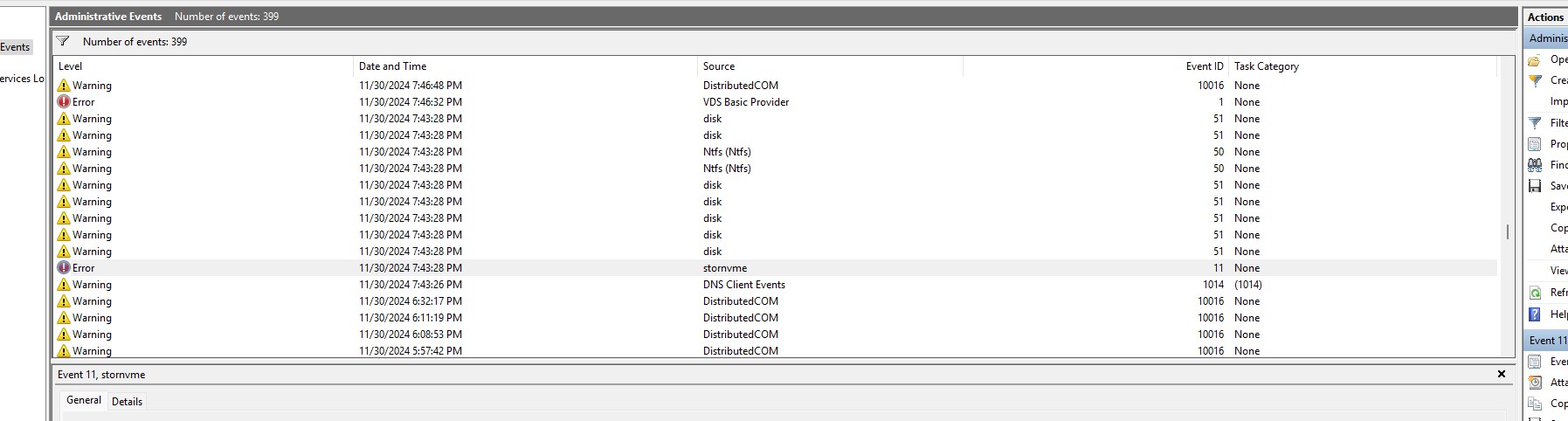
hey man i’ve been looking everywhere for info on this. just got a new pre-built pc with windows version 24H2.
I have a WD blue SN 580 2 TB NVME and keep getting blue screens when restarting the pc or opening certain files in file explorer. the event logs leading up to the blue screen in event viewer give the same event ID 11 stornvme and volmgr error. You’re saying the main reason is the new windows update? would it be wise to roll back or have you figured anything out since your last post.
23h2 Is very stable on my pc. Zero problems. You can try it.
Interesting that the error appears in event viewer after fresh Windows installation when I updating drivers and OS. After 2-3 manual restarts no more errors in event viewer.
Hi, i got exactly same issue with WD SN580 2TB. Firmware updated, fresh 24H2 Windows installation and getting BSODs with same error, just \Device\RaidPort2. Do you have any steps to fix this? Thanks
Same issue here with WD SN580 2TB - 281040WD firmware.
Windows 11 23h2 - 0 BSODs, only occasional “stornvme” error in Event Viewer on startup, but the system remains stable.
Windows 11 24h2 - Immediate BSOD after booting. A clean install of 24h2 did not resolve the issue.
I have tried several troubleshooting steps, including reinstalling the OS, updating the motherboard BIOS, and switching drivers (e.g., using the Micron NVMe driver).
Are there any planned firmware updates to address this issue?
The only solution is to revert to 23h2 and report in Windows community forum.
I did clean install of 23h2 20 days ago. ZERO BSODS, GSODS, crashes or other problems. Rock solid as always.
About the error stornvme. I got this error only after fresh install (23h2 and 24h2), but when I update Windows and drivers, manually restart my pc 2-3 times, then this error doesn’t appear anymore in even viewer. 23h2 is stable, 24h2 not.
I’m not sure this error has anything to do with blue screens because I never seen a blue screen in 6 months with 23h2.
edit: I contacted WD support but they are useless. After I told them that everything was updated and the disk status was 100%, they asked me the same questions again. I just gave up on wasting my time with them. They have to release firmware update but they won’t do it.
Hey, just an update, i changed to Samsung 990 PRO 2 TB and no more BSODs and error events. So it seems issue is really WD. There goes my trust in WD SSDs .
Errors can happen. That applies to every company. Samsung also made mistakes in the past.
What really matters in my opinion, is how a company reacts to such errors.
How fast do they acknowledge the issue (so users are not in the dark about the issue and can stop searching)?
How fast can they react and offer a patch?
And during the whole process, how transparent is the communication?
I opened up a case yesterday. They escalated it to second level support. My case number is 9514604. I will keep you updated about their response.
Same here … and I bought two 2TB SN850x drives about two weeks ago.
They arrived last Friday.
One of them is flaking out exactly like yours …
It installed it in the M2_3 slot controlled by the chipset …
The other is in M2_2 controlled by the CPU and gives me no problems.
The drive in M2_1 is a Seagate 1TB that was originally in my PS5 …
SPECS …
Gigabyte AORUS B650e Elite X AX Ice (w/ F34e BIOS)
AMD 7800x3d (undervolted)
Sapphire Pure Radeon 7900GRE
32GB Crucial Pro DDR5 6000
BeQuiet Pure Power 12 1000W
Upon waking from sleep, the system takes longer than usual, and event viewer is filled with errors. Disk Management reports a 1MB partition of unallocated space on the drive at the end of the drive while the rest of the drive is in NTFS. Diskpart claims the drive is RAW. And upon rebooting or shutting down, the system freezes and needs to be powered off by holding the power button in for 4 seconds. Upon reboot, the drive is detected correctly as NTFS, the 1MB partition of unallocated space is gone, and it’s working fine again. I haven’t put any data on the drive because of this issue, and I haven’t swapped the drive with the other SN850X because that has my Steam data and I don’t want to end up having to download all of that as I’m convinced that drive will exhibit the same behavior.
Both SN850X drives shipped with firmware 620361WD
Both drives passed all Controller and Namespace (Long and Short) tests conducted from inside the my motherboard BIOS …
Hi. Do you happen to have the F34e BIOS? I’m having issues with the newer BIOS versions, but Gigabyte has removed F34e from their official website. I contacted Gigabyte support, but it’s been over a week with no response.
 .
.