Every time I try to install the WD SSD Dashboard it gives me an error code. Missing file: 2.5.0.0/WesternDigitalDashboard.zip. I’ve tried reinstalling but still nothing. Any idea how to fix this?
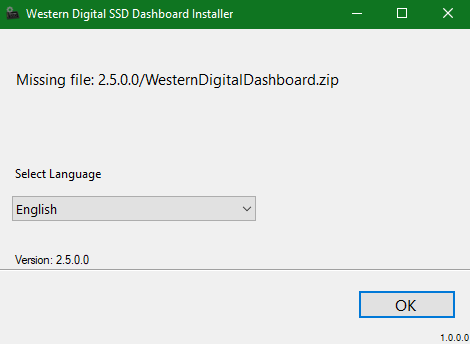
I am also experiencing this same problem of “missing file” error message, but then when I click on “OK” the app freezes (“not responding”), and I have to go into Task Manager to kill it.
I am using the v2.4.0 currently, which installed and runs properly. However, when I launch that it informs me that there’s a newer version available (2.5.0) and it’s after it “downloads” it that I see the problem, so obviously a prominent bug in v2.5.0 installer.
I also noticed that the v2.5.0 Dashboard is not available in WD Support Download page for my WD Blue SSD (500GB) , only the v2.4.0.
1 Like
Same thing here as well. It stopped and told me it couldn’t continue because a file was in use. So I quit it. Then I tried to install the V2.4.0.0 and got the missing zip file message. So I rebooted, deleted the WD folder in Program FilesX86. Then I installed the V2.2.0.5 successfully. So, WD, your installer is hosed up. Hope this doesn’t happen when there’s a firmware update! QUALITY ASSURANCE try looking that one up!
So, you dropped all the way back to v2.2.0?
Sure did. I have several WD SSDs and will be leaving V2.4.0.0 on those systems.
I may try to upgrade again but not until I see a version higher than 2.5.0.0!
Don’t know what the problem is with those writing code these days, but WD isn’t alone with installation issues for their software. I mean really…how hard is it to beta test some code before you send it out in the world. I KNOW WD has beta testers, just don’t know why they aren’t being used!
Look at MS and Windows 10 1809! What a colossal mess!
There was an issue with the server. It should be corrected now. Please discard WesternDigitalSSDDashboardSetup.exe and download a new one. If you have a cache, please clear it so you don’t get the same file back again. If there’s still a problem, we need to know about it. Thanks.

Just tried today morning. It is working fine. Able to install and also see the dashboard running.
Well I’ve tried Chrome, Edge, Firefox and IE. All I see is this:

And that’s not the correct version nor is the link to the file a .zip file it’s still a .exe file. So would you please provide a direct link to the V2.5.0 file if it isn’t too much trouble? I’ve never had this much trouble getting an update. 
The Downloads for the WD Blue 3D NAND SSD still displays only the v2.4.0, just like flthemi pointed out above which is logically where a new user would find downloads.
However, if you do to the top-of-the-page menu bar and select “Downloads”, and then “WD Software” → “Software for Windows” and expand the “WD SSD Dashboard” you will see the v2.5.0 there. Do NOT filter or search for your product name/number there as you’ll wind up in the same wrong version per above. Looks like some sloppy work by WD fixing their webserver, but at least I found and downloaded v2.5.0.
I installed the v2.5.0 download okay, and it is working, so problem solved for me!
Got it from the “top-of-the-page” link. It finally installed after two attempts. Thanks eeeehaw! WD needs to fix that other page/link!
I have been trying to install this on a new Windows 10 64Bit PC but the download is only 174K and when you run it it looks for some dll’s that are not present.
Version 2.5.0.0 04/22/2019
It seems to make a difference where/what link you download it from. So I’m going to include the link I used in this post because it worked for me, but not flawless! When it took out V2.4.0 it gave me a “file in use” error and I just told it to continue. Then I rebooted the PC and ran the install AGAIN and it installed V2.5.0. Yet on another PC it worked just fine! So it’s a hit or miss situation. It also might help to Right click the installation file and Run As Administrator instead of just double clicking it.
The link I used : http://wddashboarddownloads.wdc.com/wdDashboard/WesternDigitalSSDDashboardSetup.exe
Note that this is the SAME link you find here when you click the Download button:
BUT the page there says it’s V2.4.0 and the instructions there STILL indicating it should be a zipped file. I don’t know why the page can’t be edited to reflect the proper information. It sure is causing a lot of confusion.


